Camera and evidence layer
Video Core
Live monitoring, playback, camera health, event evidence, users, roles, audit logs and multi-site camera operations.
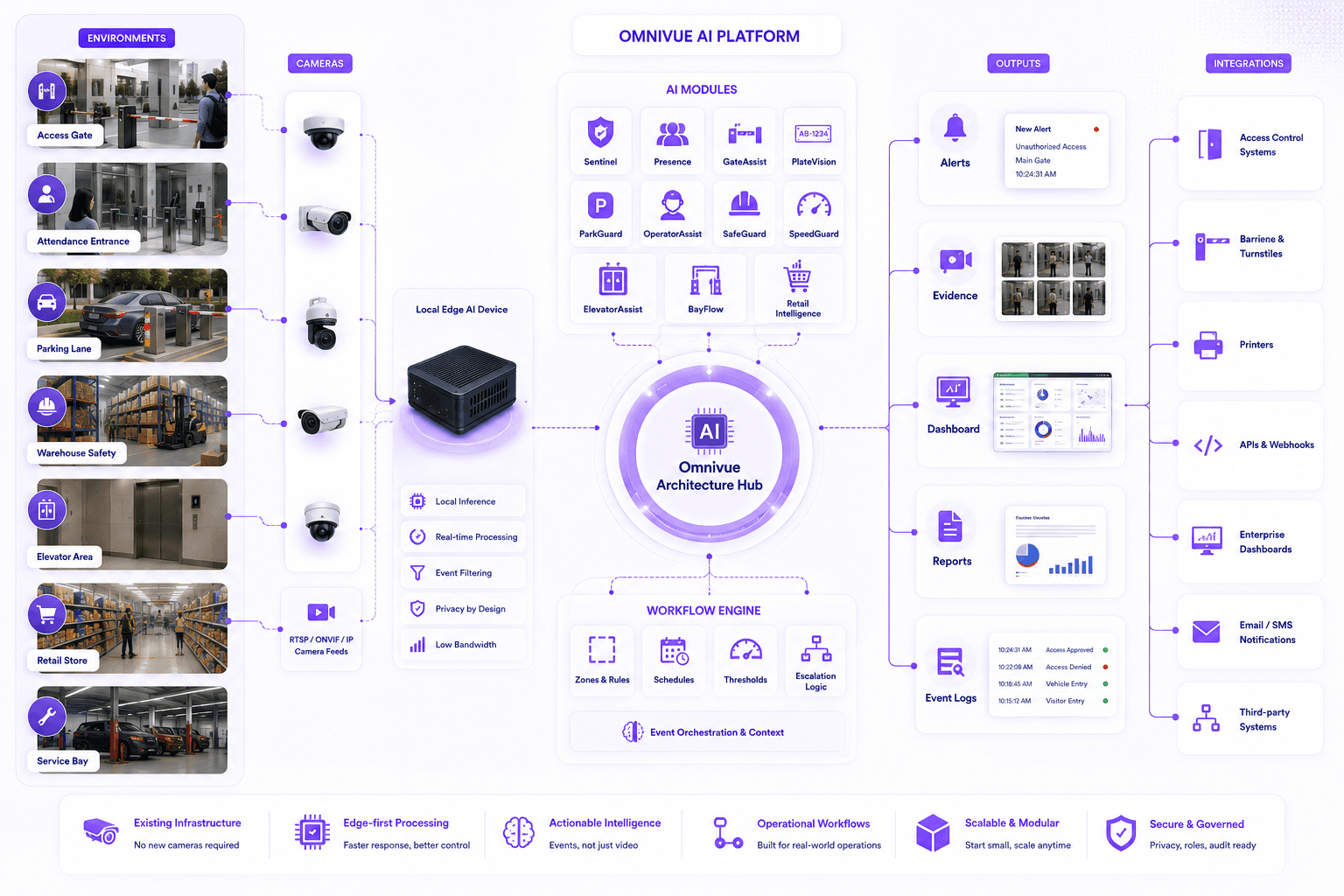
KVABI is an visual intelligence layer that connects to selected CCTV or IP camera streams, processes events on edge AI infrastructure and converts video into operational workflows for access, attendance, vehicles, safety, facilities, retail and service operations.
KVABI connects to selected CCTV, IP camera, NVR or VMS streams already available at the site where technically supported.
KVABI VMS gives teams live monitoring, playback, camera health, evidence, user roles and audit history.
Edge AI devices process selected camera views locally for faster response and better control.
Video events are converted into alerts, evidence, dashboards, reports and integrations.
Architecture principle
Video stays useful. Events become actionable.
KVABI keeps camera infrastructure in place and adds the workflow layer customers need to act on what cameras already see.
Platform layers
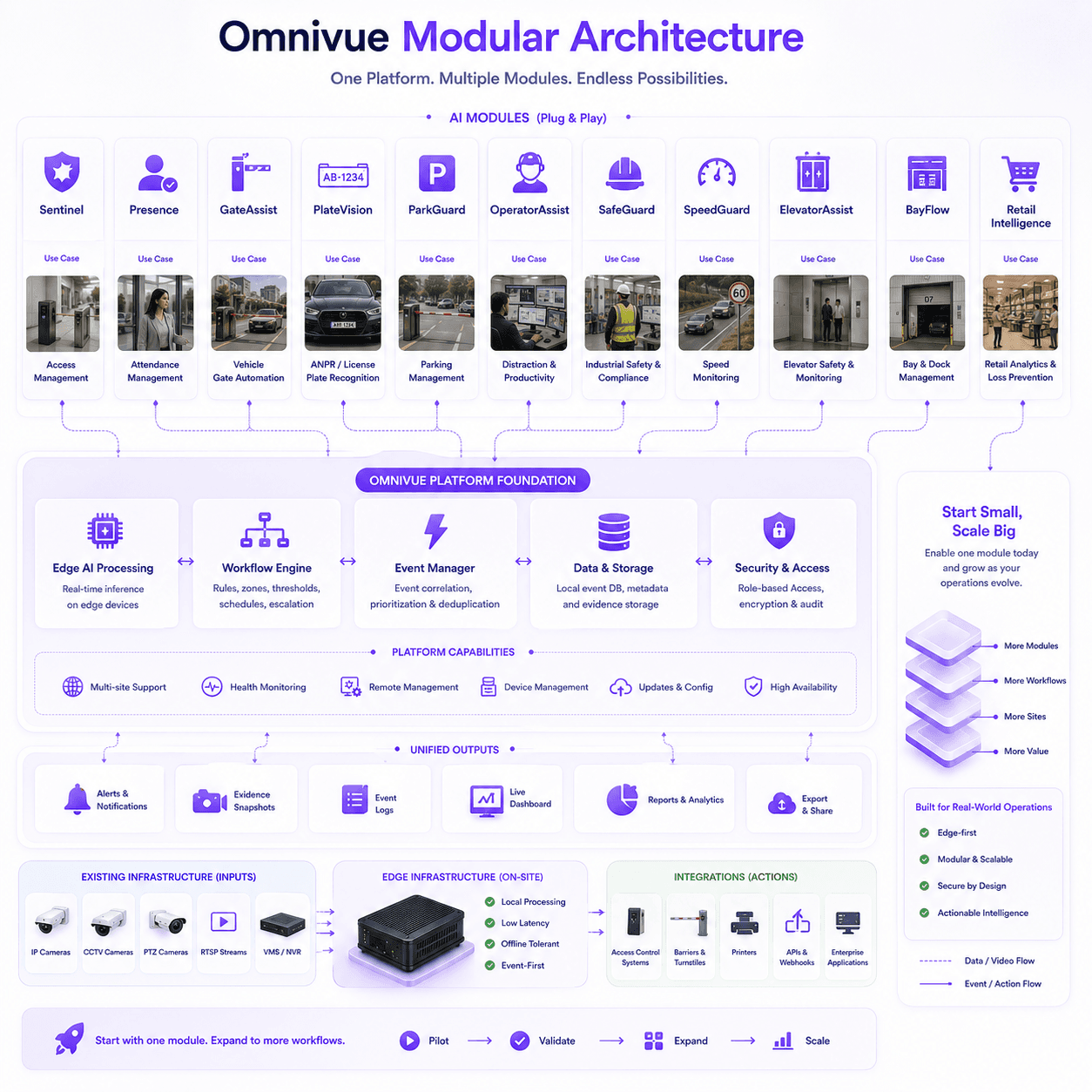
KVABI VMS should be understood as the video operations layer. KVABI AI modules sit above it to create intelligence and workflows. Integrations connect those events to site systems.
Camera and evidence layer
Live monitoring, playback, camera health, event evidence, users, roles, audit logs and multi-site camera operations.
Visual intelligence layer
KVABI converts visual activity into decisions, alerts, actions, investigations and business records.
Connected action layer
Integrations connect KVABI intelligence with barriers, turnstiles, access systems, dashboards, APIs, webhooks and operational systems.
How KVABI works
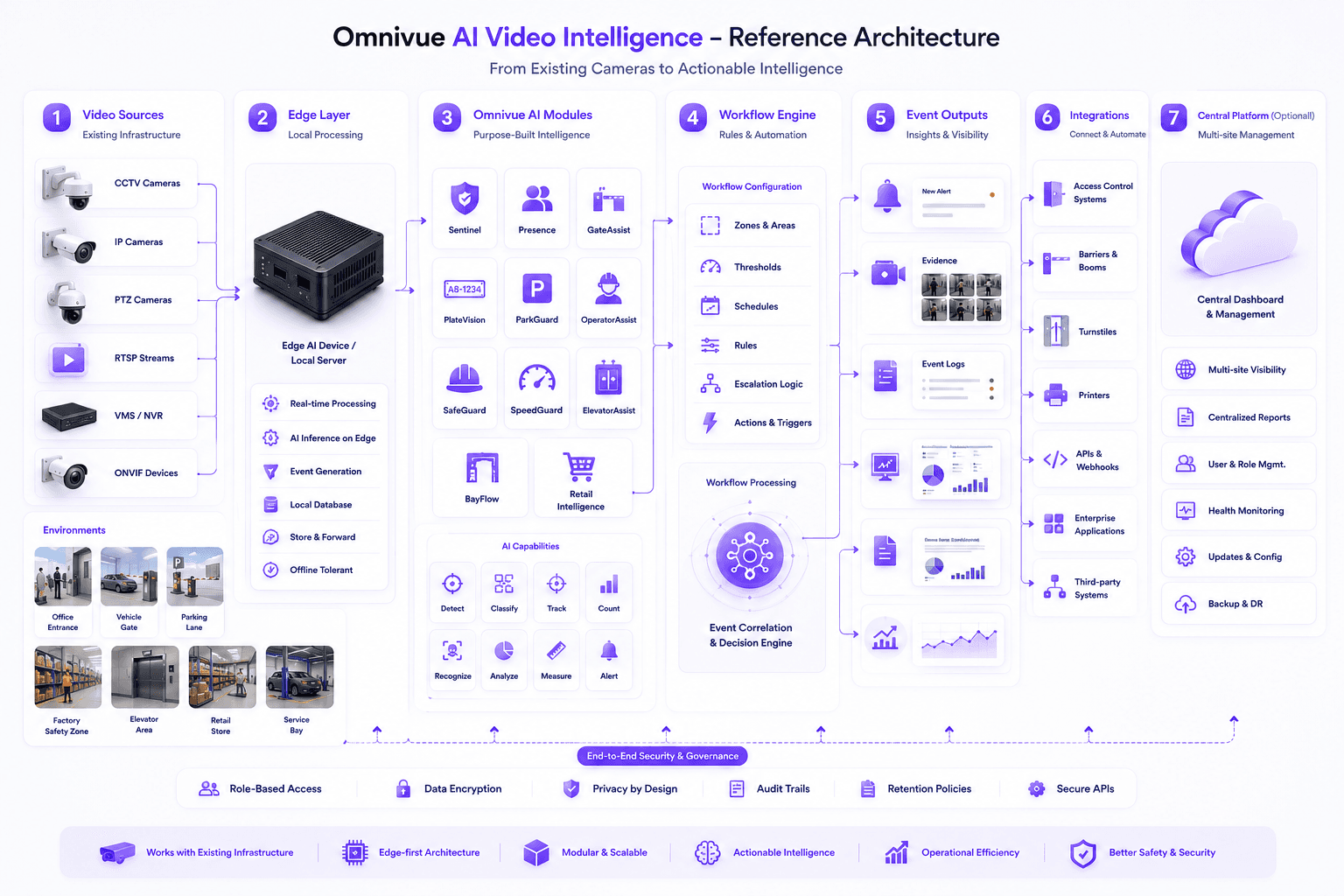
Customers do not need to understand every technical component. The important point is that KVABI converts selected video views into structured operational events that teams can act on.
Step 1
Selected CCTV, IP camera, RTSP, ONVIF, NVR or VMS streams are mapped to KVABI use cases where available.
Step 2
KVABI VMS manages live view, playback, camera health, evidence, users, roles and audit logs for the connected video operation.
Step 3
Local edge devices process relevant frames and run KVABI AI modules near the site.
Step 4
Modules such as Sentinel, Presence, PlateVision, ParkGuard and OperatorAssist detect operational events.
Step 5
Events are filtered through configured rules, zones, thresholds, timings and escalation logic.
Step 6
Qualified events produce notifications, evidence snapshots, logs and review-ready records.
Step 7
Operations teams get live visibility, analytics, history, reports and exportable evidence.
Reference architecture
KVABI can be deployed as a focused module for one use case or as a multi-module AI layer across many operational zones and sites.
Deployment models
KVABI can support local, hybrid and cloud-connected operating models depending on privacy, latency, connectivity and scale.
Best for high-security, offline-first or privacy-sensitive environments where video processing should stay within the site.
Local edge AI processing
Local database option
Works without constant internet
Useful for secure campuses and government deployments
Best for multi-site operations where each site processes locally but management needs centralized visibility.
Local site processing
Central reporting dashboard
Multi-location event visibility
Useful for warehouses, parking sites and communities
Best for teams that want remote monitoring, centralized analytics, easy access and cross-site expansion.
Remote dashboard access
Cross-site reports
Centralized administration
Useful for enterprise and partner-led rollouts
Edge AI processing
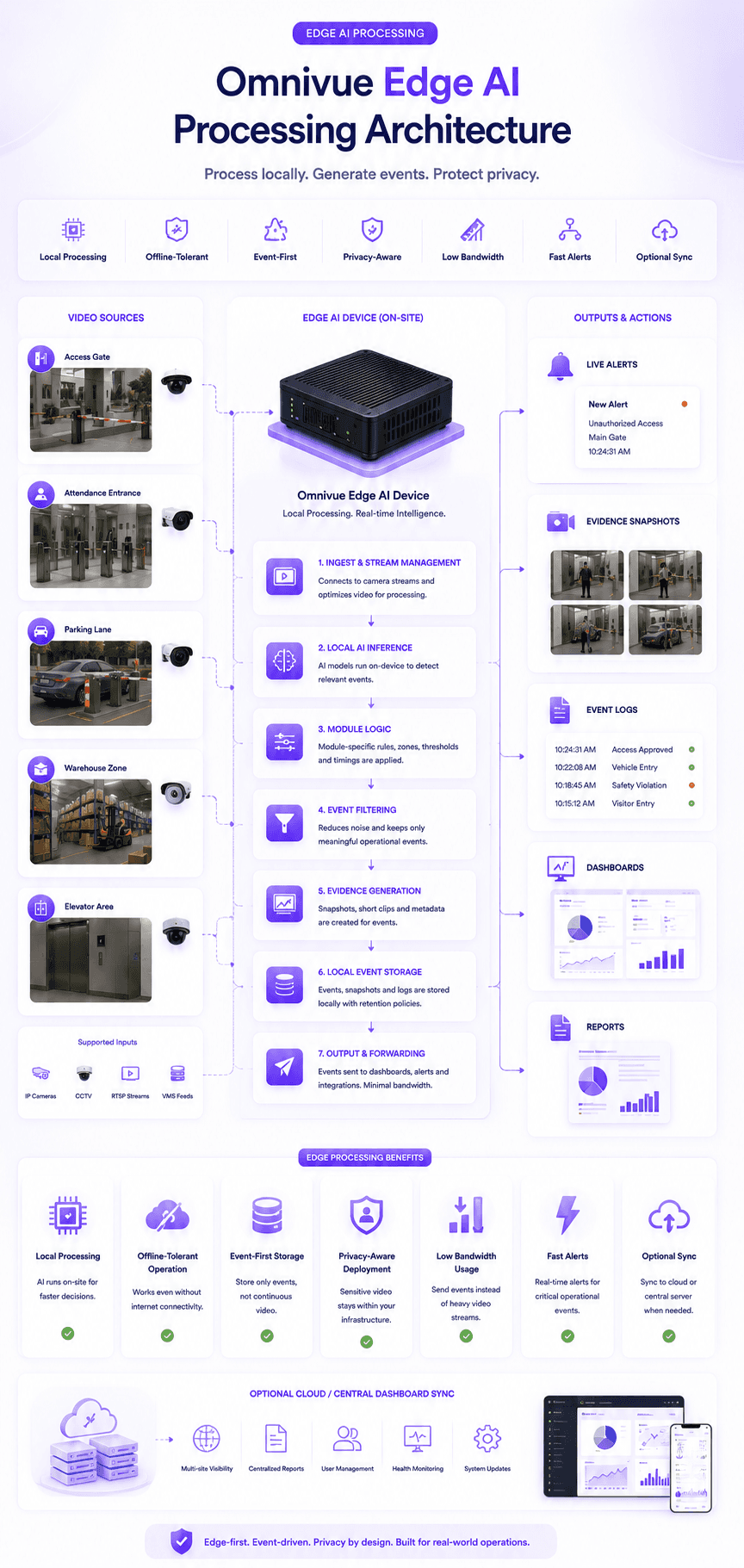
KVABI is designed around practical site operations. The edge layer helps process selected video streams locally and convert them into lightweight, structured events for the dashboard.
Camera streams are processed on edge devices so alerts can be created close to the source.
Selected workflows can continue locally even when internet connectivity is unstable or unavailable.
KVABI focuses on structured events, snapshots and logs instead of forcing continuous video uploads.
Most deployments start by connecting to existing camera streams and configuring zones and rules.
Modular architecture
Start with one workflow, then expand to more modules, zones, cameras and sites when the operational value is proven.
Integrations
KVABI can trigger or support workflows around access control, parking barriers, dashboards, local devices and enterprise integrations.
Integrate with doors, turnstiles, QR workflows, visitor approvals and identity-based access events.
Connect vehicle recognition, pass validation, queue alerts and gate workflow decisions.
Send events, alerts, reports and operational data to external dashboards or enterprise systems.
Connect selected RTSP, ONVIF, NVR or VMS stream sources where available and technically supported by the site design.
Support workflows such as parking receipts, visitor slips, gate passes and local operational output.
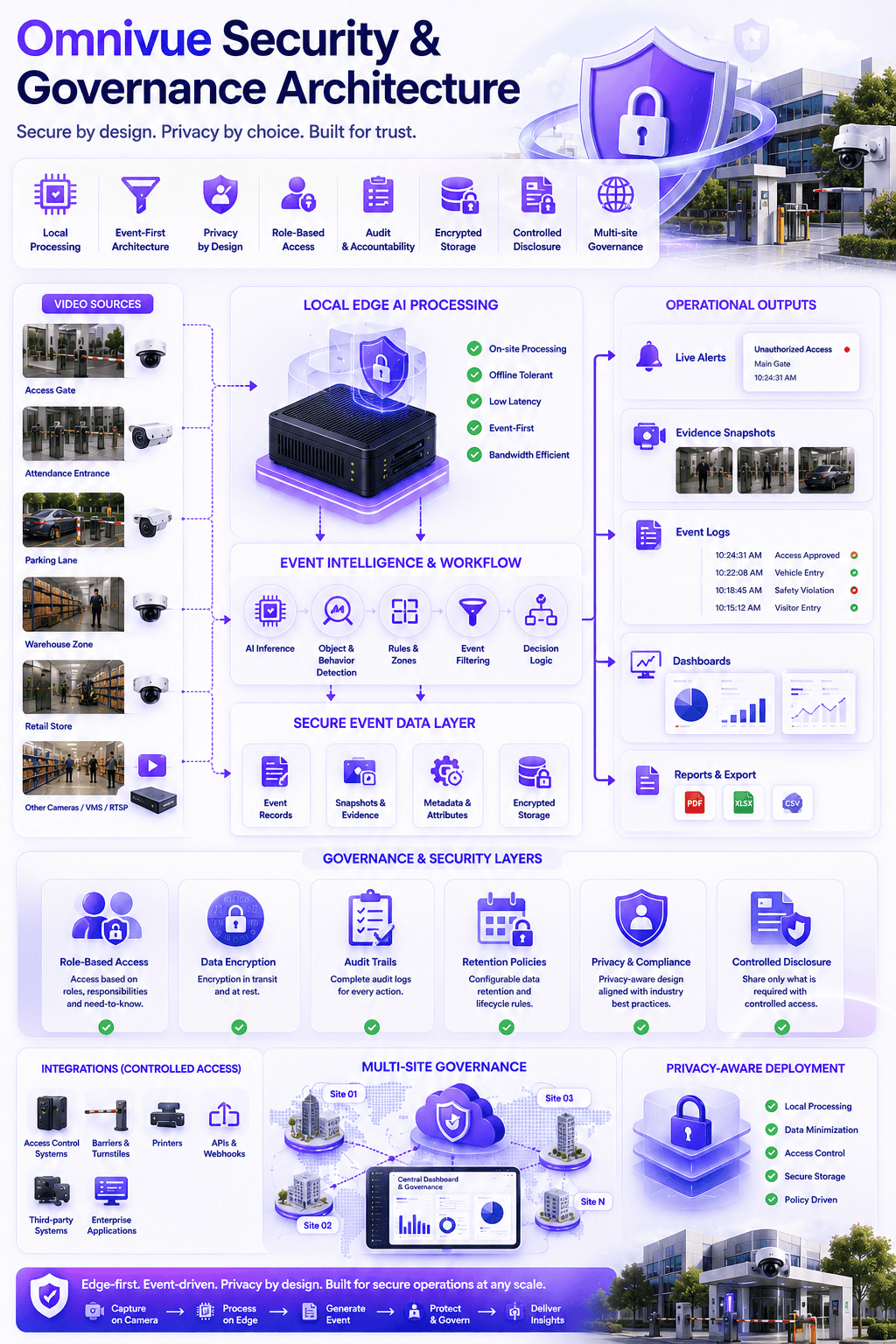
Security and governance
KVABI architecture supports privacy-aware deployment, local processing options, event-based records and role-based access for operational teams.
Sensitive camera analytics can be processed locally based on site and governance requirements.
Dashboards, event history and reports can be limited to authorized users and operational roles.
Event snapshots, logs and reports can be controlled based on retention and review policies.
Barrier, turnstile, printer, API and third-party integrations can be configured with clear control logic.
Deployment roadmap
Understand the operational problem, camera availability, site zones, user roles and success criteria.
Map selected camera streams to gates, lanes, counters, bays, aisles, doors, queues or safety zones.
Deploy the local edge AI device, connect streams and configure module-specific detection workflows.
Define thresholds, alerts, evidence snapshots, escalation rules, reports and integration requirements.
Validate event quality, false positives, missed events, uptime, user workflow and operational value.
Expand across more cameras, modules, zones, sites and integrations based on validated outcomes.
Buyer questions
This section helps buyers quickly understand deployment requirements before a detailed technical discussion.
Usually no. KVABI is designed to work with selected existing camera streams where angle, lighting and coverage are suitable.
Not necessarily. KVABI can run with local edge processing and local deployment models where cloud connectivity is not required.
Yes. Each site can process locally while central teams view alerts, reports and dashboards across locations.
Yes. KVABI can support workflow integrations with barriers, turnstiles, access systems, printers and APIs depending on the site design.
KVABI VMS provides the video operations layer for live view, playback, camera health, evidence, users and audit history. KVABI AI modules then turn selected video feeds into operational workflows, alerts, evidence and reports.
Share your site type, camera availability, operational use case and integration needs. We can help recommend the right edge, module and dashboard architecture.