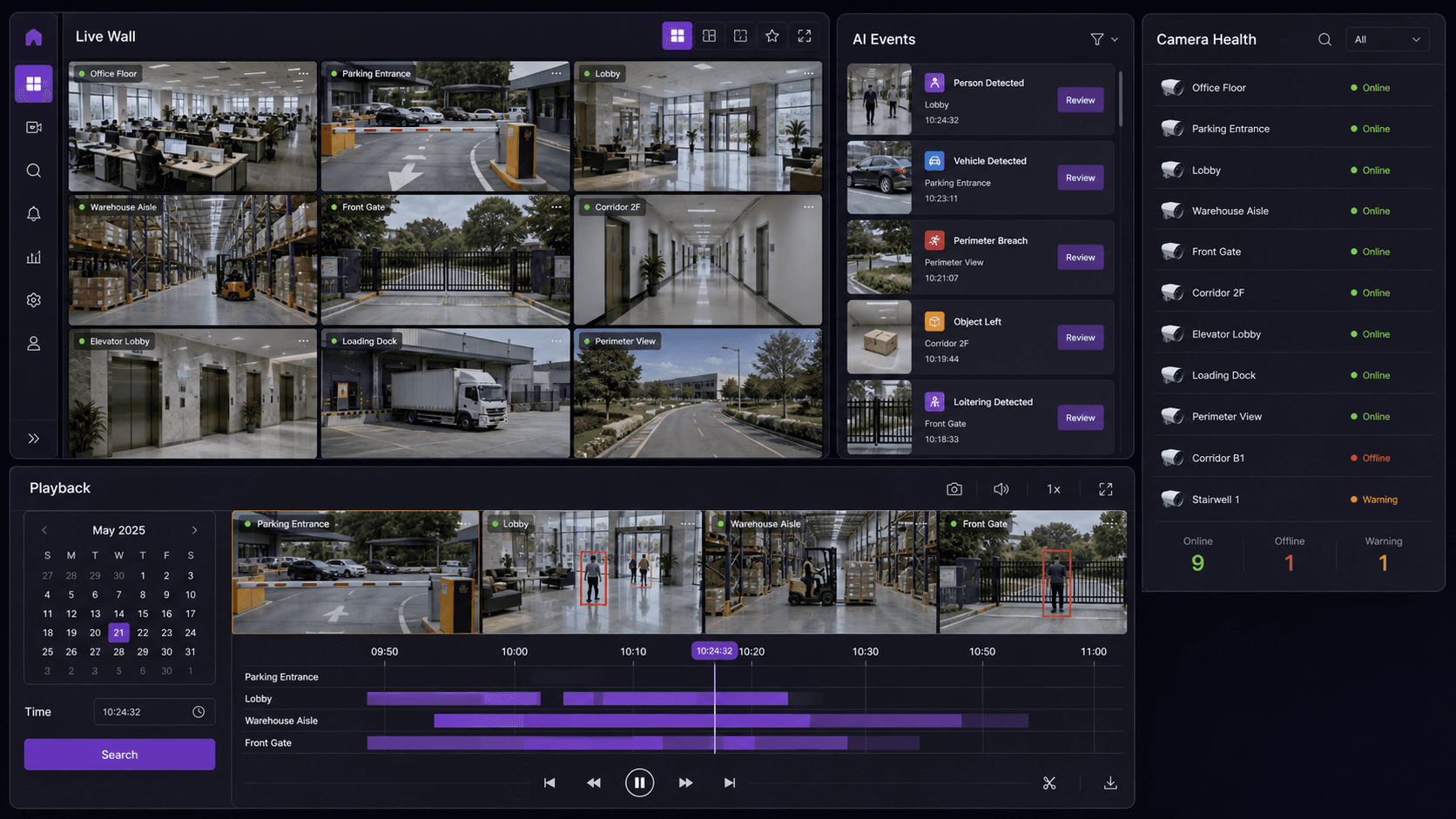
From Alert to Evidence: An Incident Walkthrough in Kvabi VMS
Follow a practical incident review in Kvabi VMS, from event context and playback to an evidence handoff and an owned operational response.

An alert tells an operator to look. It does not explain the whole incident. The useful next step is to find the right camera, review the surrounding video and preserve enough context for another person to understand the decision.
This walkthrough uses an illustrative warehouse obstruction to explain the review process to evaluate in KVABI VMS. It is not a report of a customer incident or a claim about a particular response time. The exact event integration, available recording and evidence options should be confirmed for your deployment during a demonstration.
Start with an event that can be explained
Imagine an object is left in a monitored emergency-access area. A configured safety workflow raises an event. The reviewer needs the site, camera, zone, event time and the condition that triggered attention. A label such as "obstruction" is much more useful when it is connected to a visible area and an agreed rule.
First check that the event is relevant and that the view is current or recorded as expected. If the camera cannot see the complete route, a clear image of one section cannot prove that the entire route is clear. Use video as evidence for the decision it supports, and involve the responsible site team when the situation needs physical verification.
Review the video around the event
KVABI VMS brings live monitoring, playback and AI event review into the video workflow. In a demonstration, ask the presenter to move from an event to the available recording and explain the relationship between event time and video time. The objective is to see how an operator finds context without searching an unrelated camera wall.
Review a period before the event, the event itself and a period afterwards. The earlier view can show whether the object was placed deliberately or whether the event was caused by a brief obstruction. The later view may show whether it was removed. If recording is missing or the camera clock differs from another system, preserve that uncertainty instead of inferring a complete sequence.

Decide what the evidence actually establishes
A snapshot may show an object in a zone. It may not show the duration, the reason it was there or who was responsible. A clip may establish the sequence more clearly, but it still has the limits of the camera angle and recording coverage. Separate visible facts from a reviewer's interpretation.
For the illustrative obstruction, useful notes might be "the marked route is partly occupied in this view" and "the object is no longer visible in the later recording." A claim that a person violated a policy requires the applicable policy and sufficient context. The event should support a proportionate operational response, not substitute for that judgment.
| Review step | What to capture | What not to assume |
|---|---|---|
| Identify | Site, camera, zone and event time | Every camera covers the same area |
| Inspect | Relevant before, during and after footage | A snapshot proves duration or intent |
| Preserve | Available snapshot or clip with context | An export is automatically a complete incident record |
| Handoff | Recipient, observation and required follow-up | Viewing an alert means someone acted |
Prepare an evidence handoff
Agree what the receiving team needs before exporting material. The useful package may include a selected clip, a snapshot, time and location details, and a short explanation of the observation. Demonstrate the supported evidence options and the permissions required for the user who will perform the handoff.
Keep the original context available in the source system under the site's retention policy. Avoid edits that remove important preceding or following activity. Where evidence moves to a service desk or incident system, make the reference between the two records explicit. Confirm whether that transfer is manual or integrated; do not assume every destination is connected by default.
Close the operational loop
For a blocked route, the response owner might arrange a check and removal through the site's safety process. The reviewer then needs a way to establish that the request was received and the condition was resolved. Decide where acknowledgement, follow-up and closure are recorded: in a supported Kvabi workflow, an integrated tool or an existing operating procedure.
This is where video management and operational management meet. VMS supplies the video and event evidence. People, rules and configured integrations determine the response. The warehouse safety solution provides the use-case context, while the guard-monitoring guide discusses ownership and response accountability.
Test the difficult cases in the demo
Ask to review a true event, an irrelevant alert and an event with incomplete video. Then check what a restricted user can see and export. These cases expose whether the process is usable during an actual shift, rather than only when every input is ideal.
Measure practical tasks during a scoped evaluation: locating the correct event, finding the relevant recording, understanding the evidence and completing the agreed handoff. Record the starting method so any improvement has a baseline. Do not substitute a large alert count for a better investigation process.
The live lab can show the available VMS workflow and support a discussion of your own footage. Bring one incident type and the team that would review it. A successful session ends with a clear evidence path and a clear owner for the next action.
Kvabi 2.0 live lab
Request a Kvabi VMS Workflow Demo
See the relevant Kvabi workflow in a live lab session. Describe your site and, if useful, arrange an evaluation with CCTV footage you are authorized to share. Sample requirements and transfer arrangements are agreed after your request.